Style Gallery
Every calendar here is a real SuperDatePicker configuration. Browse for inspiration — or grab the exact settings and apply them to your report.
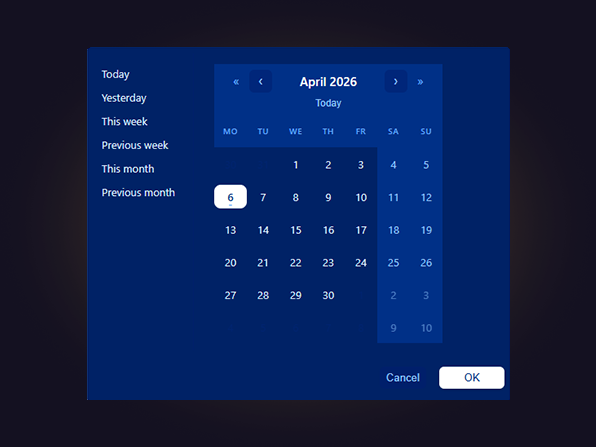
Brand Match
Every surface, border, and accent replaced to match a corporate brand palette. The calendar visually disappears into the report — exactly as it should.
View configuration
{
  "calendarDialog": {
    "dialogUseCustomSize": true,
    "dialogWidth": 520,
    "dialogHeight": 460,
    "calendarDialogBackgroundColor": "#002266",
    "calendarDividerColor": "#001f6b",
    "calendarInputBackgroundColor": "#00267a",
    "calendarInputBorderColor": "#001f6b"
  },
  "calendarStyle": {
    "calendarFontFamily": "Segoe UI",
    "calendarFontSize": 13,
    "calendarBodyTextColor": "#dbeafe",
    "calendarBorderColor": "#001f6b",
    "calendarBorderWidth": 1,
    "calendarHeaderBackgroundColor": "#003087",
    "calendarHeaderTextColor": "#ffffff",
    "calendarHeaderFontSize": 15,
    "calendarArrowBackgroundColor": "#00267a",
    "calendarArrowColor": "#93c5fd",
    "calendarArrowHoverBackgroundColor": "#001f6b",
    "calendarArrowHoverColor": "#bfdbfe",
    "calendarYearArrowBackgroundColor": "transparent",
    "calendarYearArrowColor": "#60a5fa",
    "calendarYearArrowHoverBackgroundColor": "#00267a",
    "calendarYearArrowHoverColor": "#93c5fd",
    "calendarWeekdayBackgroundColor": "#003087",
    "calendarWeekdayTextColor": "#60a5fa",
    "calendarBodyBackgroundColor": "#003087",
    "calendarWeekendBackgroundColor": "#003087",
    "calendarWeekendTextColor": "#93c5fd",
    "calendarTodayColor": "#93c5fd",
    "calendarDisabledDayColor": "#00267a",
    "calendarCellWidth": 0,
    "calendarCellHeight": 0,
    "calendarRowGap": 0,
    "calendarHoverBackgroundColor": "#00267a",
    "calendarHoverTextColor": "#ffffff"
  },
  "calendarSelection": {
    "calendarSelectedBackgroundColor": "#ffffff",
    "calendarSelectedTextColor": "#003087",
    "calendarRangeMiddleBackgroundColor": "#00267a",
    "calendarRangeMiddleTextColor": "#bfdbfe"
  },
  "calendarButtons": {
    "calendarTodayNavShow": true,
    "calendarTodayNavColor": "#93c5fd",
    "calendarTodayNavHoverBackgroundColor": "#001f6b",
    "calendarTodayNavFontSize": 12,
    "calendarTodayNavUppercase": false,
    "calendarTodayNavGapTop": 4,
    "calendarTodayNavGapBottom": 4,
    "calendarOkBackgroundColor": "#ffffff",
    "calendarOkTextColor": "#003087",
    "calendarCancelBackgroundColor": "#001f6b",
    "calendarCancelTextColor": "#93c5fd"
  },
  "mainInputbox": {
    "fontSize": 12,
    "fontFamily": "Segoe UI",
    "fontColor": "#dbeafe",
    "backgroundColor": "#003087",
    "borderColor": "#001f6b",
    "borderWidth": 1,
    "borderRadius": 8,
    "iconShow": true,
    "iconColor": "#93c5fd",
    "iconSize": 20,
    "iconVersion": 1,
    "closeIconShow": true,
    "closeIconColor": "#ef4444",
    "closeIconSize": 16
  },
  "presetRanges": {
    "showToday": true,
    "showYesterday": true,
    "showThisWeek": true,
    "showLastWeek": true,
    "showThisMonth": true,
    "showLastMonth": true,
    "showThisYear": false,
    "showLastYear": false,
    "showDaysUpToday": false,
    "showDaysStartingToday": false,
    "showClearButton": true,
    "defaultDaysCount": 7,
    "presetPosition": "top",
    "presetAlignment": "left",
    "presetSelectedBackgroundColor": "#ffffff",
    "presetSelectedTextColor": "#003087",
    "presetGap": 0
  },
  "advancedSettings": {
    "refreshInfo": false,
    "refreshInfoIconColor": "#60a5fa",
    "refreshInfoTextColor": "#3b82f6"
  },
  "selectionType": {
    "calendarType": "range",
    "miniSelectionMode": "range",
    "firstWeekday": "monday"
  }
}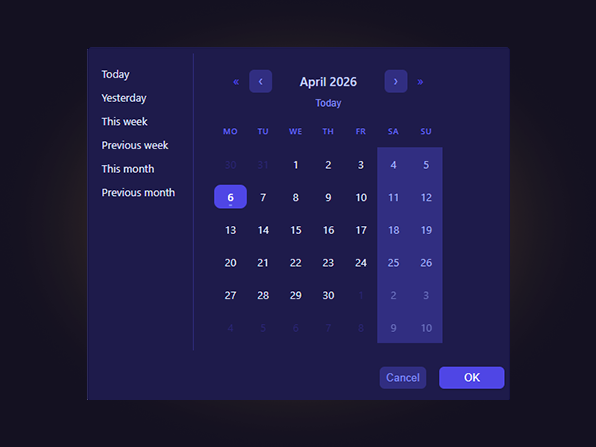
Dark Executive
Very dark surface, gold accent, custom geometric font. Built for dashboards where the date picker needs to feel as polished as the rest of the report.
View configuration
{
  "calendarDialog": {
    "dialogUseCustomSize": true,
    "dialogWidth": 380,
    "dialogHeight": 460,
    "calendarDialogBackgroundColor": "#09090b",
    "calendarDividerColor": "#27272a",
    "calendarInputBackgroundColor": "#18181b",
    "calendarInputBorderColor": "#27272a"
  },
  "calendarStyle": {
    "calendarFontFamily": "Trebuchet MS",
    "calendarFontSize": 13,
    "calendarBodyTextColor": "#d4d4d8",
    "calendarBorderColor": "#27272a",
    "calendarBorderWidth": 1,
    "calendarHeaderBackgroundColor": "#09090b",
    "calendarHeaderTextColor": "#fbbf24",
    "calendarHeaderFontSize": 16,
    "calendarArrowBackgroundColor": "#18181b",
    "calendarArrowColor": "#a16207",
    "calendarArrowHoverBackgroundColor": "#27272a",
    "calendarArrowHoverColor": "#fbbf24",
    "calendarYearArrowBackgroundColor": "transparent",
    "calendarYearArrowColor": "#713f12",
    "calendarYearArrowHoverBackgroundColor": "#18181b",
    "calendarYearArrowHoverColor": "#a16207",
    "calendarWeekdayBackgroundColor": "#09090b",
    "calendarWeekdayTextColor": "#713f12",
    "calendarBodyBackgroundColor": "#09090b",
    "calendarWeekendBackgroundColor": "#09090b",
    "calendarWeekendTextColor": "#52525b",
    "calendarTodayColor": "#fbbf24",
    "calendarDisabledDayColor": "#27272a",
    "calendarCellWidth": 0,
    "calendarCellHeight": 0,
    "calendarRowGap": 0,
    "calendarHoverBackgroundColor": "#1c1917",
    "calendarHoverTextColor": "#fbbf24"
  },
  "calendarSelection": {
    "calendarSelectedBackgroundColor": "#b45309",
    "calendarSelectedTextColor": "#ffffff",
    "calendarRangeMiddleBackgroundColor": "#1c1917",
    "calendarRangeMiddleTextColor": "#fbbf24"
  },
  "calendarButtons": {
    "calendarTodayNavShow": true,
    "calendarTodayNavColor": "#fbbf24",
    "calendarTodayNavHoverBackgroundColor": "#1c1917",
    "calendarTodayNavFontSize": 12,
    "calendarTodayNavUppercase": false,
    "calendarTodayNavGapTop": 4,
    "calendarTodayNavGapBottom": 4,
    "calendarOkBackgroundColor": "#b45309",
    "calendarOkTextColor": "#ffffff",
    "calendarCancelBackgroundColor": "#18181b",
    "calendarCancelTextColor": "#a1a1aa"
  },
  "mainInputbox": {
    "fontSize": 12,
    "fontFamily": "Trebuchet MS",
    "fontColor": "#d4d4d8",
    "backgroundColor": "#09090b",
    "borderColor": "#27272a",
    "borderWidth": 1,
    "borderRadius": 6,
    "iconShow": true,
    "iconColor": "#fbbf24",
    "iconSize": 20,
    "iconVersion": 1,
    "closeIconShow": true,
    "closeIconColor": "#ef4444",
    "closeIconSize": 16
  },
  "presetRanges": {
    "showToday": false,
    "showYesterday": false,
    "showThisWeek": false,
    "showLastWeek": false,
    "showThisMonth": false,
    "showLastMonth": false,
    "showThisYear": false,
    "showLastYear": false,
    "showDaysUpToday": false,
    "showDaysStartingToday": false,
    "showClearButton": false,
    "defaultDaysCount": 7,
    "presetPosition": "top",
    "presetAlignment": "left",
    "presetSelectedBackgroundColor": "#b45309",
    "presetSelectedTextColor": "#ffffff",
    "presetGap": 0
  },
  "advancedSettings": {
    "refreshInfo": false,
    "refreshInfoIconColor": "#52525b",
    "refreshInfoTextColor": "#3f3f46"
  },
  "selectionType": {
    "calendarType": "single",
    "miniSelectionMode": "single",
    "firstWeekday": "monday"
  }
}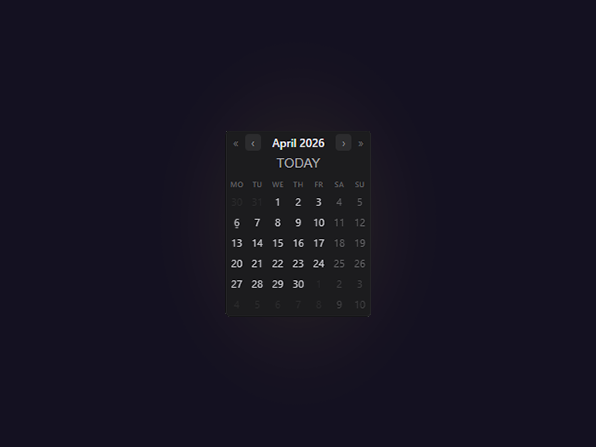
Micro Widget
MiniCalendar variant at its smallest configurable size. Neutral styling keeps the focus on compactness — proof that a fully functional date picker can take up almost no space.
View configuration
{
  "calendarDialog": {
    "dialogUseCustomSize": true,
    "dialogWidth": 520,
    "dialogHeight": 460,
    "calendarDialogBackgroundColor": "#ffffff",
    "calendarDividerColor": "#e2e8f0",
    "calendarInputBackgroundColor": "#f8fafc",
    "calendarInputBorderColor": "#e2e8f0"
  },
  "calendarStyle": {
    "calendarFontFamily": "Segoe UI",
    "calendarFontSize": 11,
    "calendarBodyTextColor": "#c7c7cc",
    "calendarBorderColor": "#2c2c2e",
    "calendarBorderWidth": 2,
    "calendarHeaderBackgroundColor": "#1c1c1e",
    "calendarHeaderTextColor": "#e5e5ea",
    "calendarHeaderFontSize": 12,
    "calendarArrowBackgroundColor": "#2c2c2e",
    "calendarArrowColor": "#8e8e93",
    "calendarArrowHoverBackgroundColor": "#3a3a3c",
    "calendarArrowHoverColor": "#1e293b",
    "calendarYearArrowBackgroundColor": "transparent",
    "calendarYearArrowColor": "#636366",
    "calendarYearArrowHoverBackgroundColor": "#2c2c2e",
    "calendarYearArrowHoverColor": "#1e293b",
    "calendarWeekdayBackgroundColor": "#1c1c1e",
    "calendarWeekdayTextColor": "#636366",
    "calendarBodyBackgroundColor": "#1c1c1e",
    "calendarWeekendBackgroundColor": "#1c1c1e",
    "calendarWeekendTextColor": "#636366",
    "calendarTodayColor": "#aeaeb2",
    "calendarDisabledDayColor": "#3a3a3c",
    "calendarCellWidth": 0,
    "calendarCellHeight": 0,
    "calendarRowGap": 0,
    "calendarHoverBackgroundColor": "#f1f5f9",
    "calendarHoverTextColor": "#334155"
  },
  "calendarSelection": {
    "calendarSelectedBackgroundColor": "#636366",
    "calendarSelectedTextColor": "#ffffff",
    "calendarRangeMiddleBackgroundColor": "#2c2c2e",
    "calendarRangeMiddleTextColor": "#aeaeb2"
  },
  "calendarButtons": {
    "calendarTodayNavShow": true,
    "calendarTodayNavColor": "#aeaeb2",
    "calendarTodayNavHoverBackgroundColor": "#2c2c2e",
    "calendarTodayNavFontSize": 14,
    "calendarTodayNavUppercase": true,
    "calendarTodayNavGapTop": 4,
    "calendarTodayNavGapBottom": 4,
    "calendarOkBackgroundColor": "#636366",
    "calendarOkTextColor": "#ffffff",
    "calendarCancelBackgroundColor": "#2c2c2e",
    "calendarCancelTextColor": "#8e8e93"
  },
  "mainInputbox": {
    "fontSize": 10,
    "fontFamily": "Segoe UI",
    "fontColor": "#c7c7cc",
    "backgroundColor": "#1c1c1e",
    "borderColor": "#2c2c2e",
    "borderWidth": 1,
    "borderRadius": 4,
    "iconShow": true,
    "iconColor": "#8e8e93",
    "iconSize": 14,
    "iconVersion": 1,
    "closeIconShow": true,
    "closeIconColor": "#ef4444",
    "closeIconSize": 18
  },
  "presetRanges": {
    "showToday": false,
    "showYesterday": false,
    "showThisWeek": false,
    "showLastWeek": false,
    "showThisMonth": false,
    "showLastMonth": false,
    "showThisYear": false,
    "showLastYear": false,
    "showDaysUpToday": false,
    "showDaysStartingToday": false,
    "showClearButton": false,
    "defaultDaysCount": 7,
    "presetPosition": "top",
    "presetAlignment": "left",
    "presetSelectedBackgroundColor": "#3b82f6",
    "presetSelectedTextColor": "#ffffff",
    "presetGap": 0
  },
  "advancedSettings": {
    "refreshInfo": false,
    "refreshInfoIconColor": "#48484a",
    "refreshInfoTextColor": "#3a3a3c"
  },
  "selectionType": {
    "calendarType": "mini",
    "miniSelectionMode": "range",
    "firstWeekday": "monday"
  }
}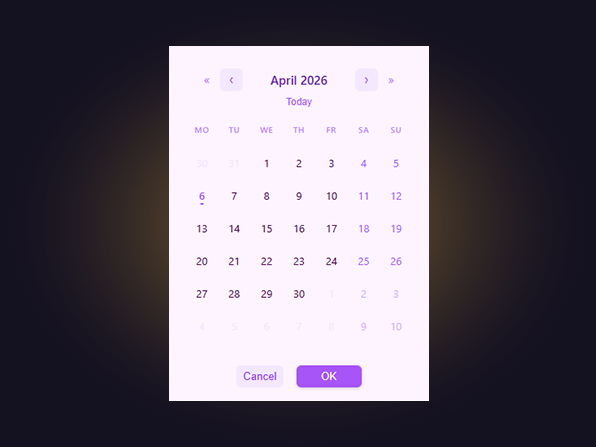
Pastel Soft
Light mode with a soft pastel palette, rounded cells, and generous spacing. For marketing, HR, or customer-facing reports where the visual should feel approachable, not corporate.
View configuration
{
  "calendarDialog": {
    "dialogUseCustomSize": false,
    "dialogWidth": 380,
    "dialogHeight": 430,
    "calendarDialogBackgroundColor": "#fdf4ff",
    "calendarDividerColor": "#f3e8ff",
    "calendarInputBackgroundColor": "#ffffff",
    "calendarInputBorderColor": "#f3e8ff"
  },
  "calendarStyle": {
    "calendarFontFamily": "Segoe UI",
    "calendarFontSize": 13,
    "calendarBodyTextColor": "#4a044e",
    "calendarBorderColor": "#f3e8ff",
    "calendarBorderWidth": 1,
    "calendarHeaderBackgroundColor": "#fdf4ff",
    "calendarHeaderTextColor": "#6b21a8",
    "calendarHeaderFontSize": 15,
    "calendarArrowBackgroundColor": "#f3e8ff",
    "calendarArrowColor": "#a855f7",
    "calendarArrowHoverBackgroundColor": "#e9d5ff",
    "calendarArrowHoverColor": "#6b21a8",
    "calendarYearArrowBackgroundColor": "transparent",
    "calendarYearArrowColor": "#c084fc",
    "calendarYearArrowHoverBackgroundColor": "#f3e8ff",
    "calendarYearArrowHoverColor": "#a855f7",
    "calendarWeekdayBackgroundColor": "#fdf4ff",
    "calendarWeekdayTextColor": "#c084fc",
    "calendarBodyBackgroundColor": "#ffffff",
    "calendarWeekendBackgroundColor": "#fdf4ff",
    "calendarWeekendTextColor": "#a855f7",
    "calendarTodayColor": "#a855f7",
    "calendarDisabledDayColor": "#e9d5ff",
    "calendarCellWidth": 0,
    "calendarCellHeight": 0,
    "calendarRowGap": 0,
    "calendarHoverBackgroundColor": "#f3e8ff",
    "calendarHoverTextColor": "#6b21a8"
  },
  "calendarSelection": {
    "calendarSelectedBackgroundColor": "#a855f7",
    "calendarSelectedTextColor": "#ffffff",
    "calendarRangeMiddleBackgroundColor": "#f3e8ff",
    "calendarRangeMiddleTextColor": "#7e22ce"
  },
  "calendarButtons": {
    "calendarTodayNavShow": true,
    "calendarTodayNavColor": "#a855f7",
    "calendarTodayNavHoverBackgroundColor": "#f3e8ff",
    "calendarTodayNavFontSize": 12,
    "calendarTodayNavUppercase": false,
    "calendarTodayNavGapTop": 4,
    "calendarTodayNavGapBottom": 4,
    "calendarOkBackgroundColor": "#a855f7",
    "calendarOkTextColor": "#ffffff",
    "calendarCancelBackgroundColor": "#f3e8ff",
    "calendarCancelTextColor": "#9333ea"
  },
  "mainInputbox": {
    "fontSize": 12,
    "fontFamily": "Segoe UI",
    "fontColor": "#4a044e",
    "backgroundColor": "#fdf4ff",
    "borderColor": "#f3e8ff",
    "borderWidth": 1,
    "borderRadius": 12,
    "iconShow": true,
    "iconColor": "#a855f7",
    "iconSize": 20,
    "iconVersion": "1",
    "closeIconShow": true,
    "closeIconColor": "#ef4444",
    "closeIconSize": 16
  },
  "presetRanges": {
    "showToday": false,
    "showYesterday": false,
    "showThisWeek": false,
    "showLastWeek": false,
    "showThisMonth": false,
    "showLastMonth": false,
    "showThisYear": false,
    "showLastYear": false,
    "showDaysUpToday": false,
    "showDaysStartingToday": false,
    "showClearButton": false,
    "defaultDaysCount": 7,
    "presetPosition": "top",
    "presetAlignment": "left",
    "presetSelectedBackgroundColor": "#a855f7",
    "presetSelectedTextColor": "#ffffff",
    "presetGap": 0
  },
  "advancedSettings": {
    "refreshInfo": false,
    "refreshInfoIconColor": "#c084fc",
    "refreshInfoTextColor": "#e9d5ff"
  },
  "selectionType": {
    "calendarType": "single",
    "miniSelectionMode": "single",
    "firstWeekday": "monday"
  }
}